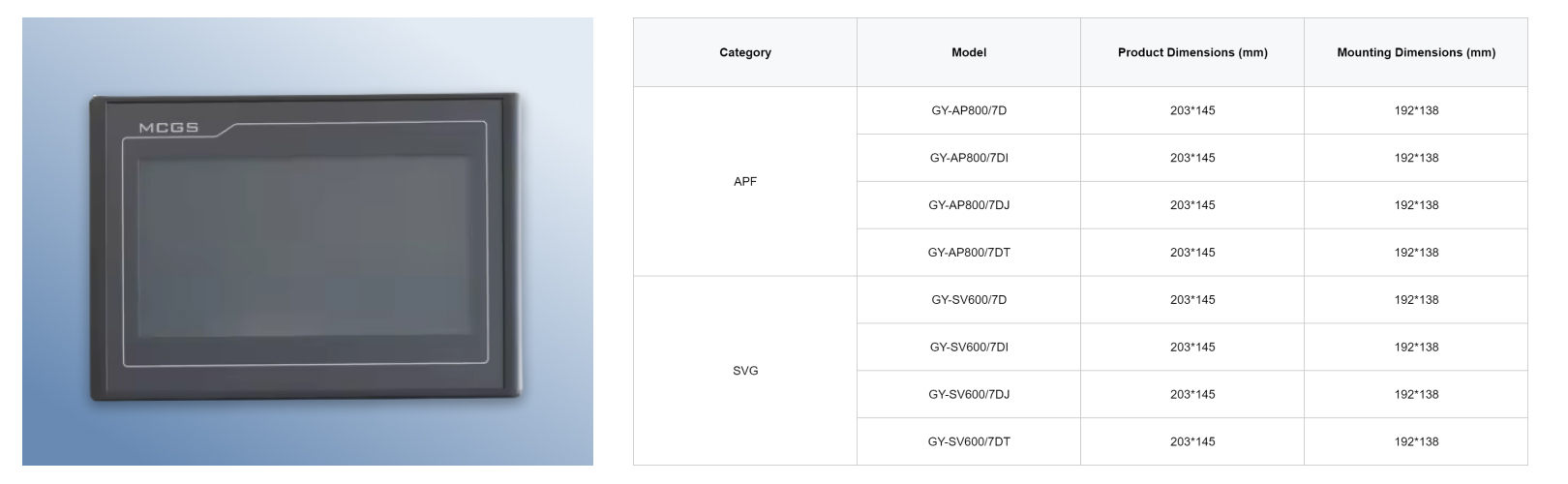
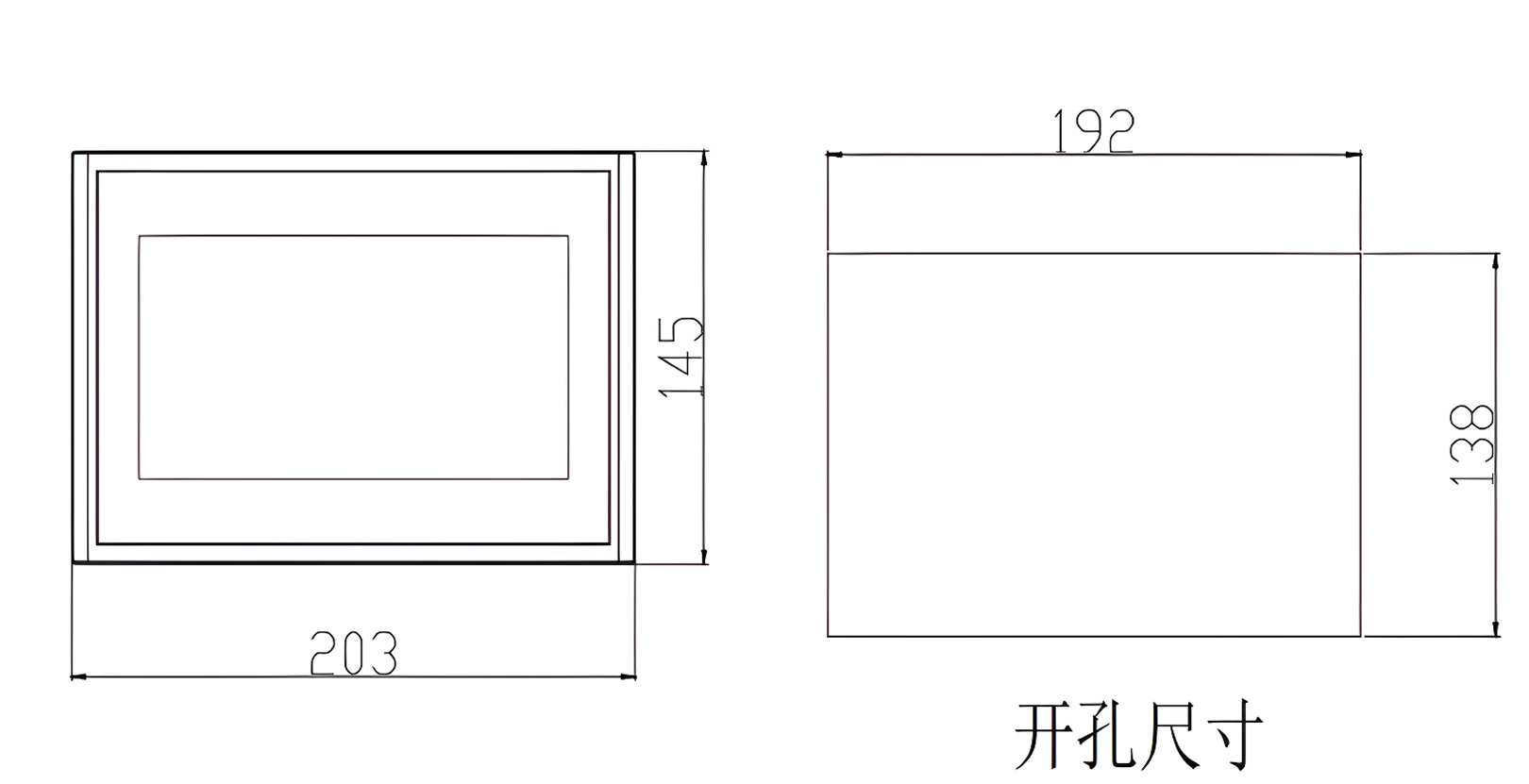
Industry Background and Market Demand
Industrial sectors such as power distribution, manufacturing automation, energy generation, and smart infrastructure rely on accurate and timely data to maintain reliability and efficiency. As systems become more complex and data‑dense, the need for high‑quality visual interfaces has risen significantly. Displayer Screens serve as human‑machine interfaces (HMIs) that provide real‑time feedback on operational states, alarms, setpoints, event logs, and analytical dashboards.
In contexts such as power quality compensation panels, display screens show key parameters like voltage, current, reactive power, harmonics, and system health, enabling engineers and operators to monitor and adjust performance on the fly. Industrial display screens are commonly found in control panels, power quality equipment, PLC (Programmable Logic Controller) interfaces, SCADA (Supervisory Control and Data Acquisition) systems, and distributed energy resource systems, among other applications. Their adoption reflects both modernization trends in industrial automation and the growing emphasis on data visibility as a tool for optimizing uptime and reducing operational risk.
Core Concept and Key Technologies
A displayer screen in an industrial setting is more than a simple visual output device; it is an engineered interface system tailored for reliability, readability, and integration with industrial controls. Key technologies that distinguish these screens from consumer products include:
1. Flat‑Panel Display Technology
Industrial screens typically employ flat‑panel display technologies such as LCD (Liquid Crystal Display) or LED‑backlit panels, which provide high contrast, color fidelity, and low latency visualization suitable for control and diagnostic interfaces. Flat panels allow for thin profiles and reduced weight while supporting various resolutions required for industrial data visualization.
2. Backlight and Brightness Engineering
Since LCDs do not emit light on their own, they rely on backlighting systems, often LED based, to ensure visibility under diverse ambient conditions. High brightness levels are essential for readability in well‑lit industrial environments or near light sources typical of facilities with overhead lighting or natural daylight.
3. Touch Interaction and Human‑Machine Interface (HMI) Integration
Many modern industrial screens incorporate touch functionality, enabling intuitive interaction with control systems. Resistive and capacitive touch technologies are both used depending on the application environment. Resistive touch can work with gloves and styluses, while capacitive touch offers multi‑touch gestures and enhanced responsiveness.
4. Robust Electronics and Firmware
Industrial display controllers and drivers ensure that the screen remains responsive and reliable. These systems process input signals from host controllers (such as PLCs or embedded industrial controllers) and drive pixels accurately even under electrical noise conditions common in industrial settings.
Product Structure, Performance, Materials, and Manufacturing
A typical industrial displayer screen consists of the following components:
Display Panel
The core visual element, usually an LCD with LED backlight, designed for durability and extended operational lifespan. Panels may range from small sizes (5–7 inches) for embedded control devices to larger screens (15 inches or more) for control room dashboards.
Touch Interface Layer
If equipped with touch capability, the external surface includes a touch sensor layer—either resistive or capacitive—allowing direct user interaction. The method of touch influences responsiveness, tolerance to moisture, and glove usability.
Protective Housing
Industrial display screens are often enclosed in rugged metal or high‑grade polymer frames. These housings offer mechanical protection against vibration, shock, dust, and other environmental hazards common in manufacturing and power systems environments.
Backlighting System
An LED backlight illuminates the LCD panel uniformly, ensuring consistent visibility. Modern LED backlights are engineered for power efficiency and long service life.
Controller Electronics
Embedded logic and drive electronics handle input signals (e.g., VGA, HDMI, RS‑232/485, custom industrial protocols) and convert them to pixel‑level commands. These electronics must be designed for industrial voltage variability and electromagnetic compatibility.
Manufacturing processes for industrial screens focus on tight quality control, including optical bonding (eliminating air gaps for better clarity), EMI shielding, and thermal management. Optical bonding, for example, can reduce reflections and improve contrast, enhancing readability in bright lighting conditions.
Factors Influencing Quality and Performance
Operating Environment
Industrial environments vary widely—from climate‑controlled control rooms to harsh shop floors with significant dust, vibration, and heat. Displayer screens must be designed with adequate ingress protection (e.g., IP54, IP65 ratings) and thermal tolerance to remain functional across diverse conditions.
Brightness and Contrast
Adequate brightness ensures that screens remain legible under strong overhead light or indirect sunlight. Bright panels with anti‑glare coatings provide consistent readability, minimizing operator error and eye strain.
Touch Sensitivity and Accuracy
For touch‑enabled screens, the responsiveness and precision of touch detection are critical. Industrial settings with glove use or conditions with moisture or contaminants require specific touch technologies that maintain performance under such constraints.
Integration with Control Systems
Display quality and performance are impacted by how well the screen integrates with existing control systems. The display must correctly interpret signals from PLCs, HMIs, or embedded platforms and translate them into user‑readable output without lag or distortion.
Supply Chain and Supplier Selection Standards
When selecting a manufacturer or supplier for industrial display screens, several criteria can influence procurement quality and long‑term satisfaction:
Certifications and Standards
Ensure that screens comply with relevant safety and quality standards such as CE, UL, and RoHS. Compliance indicates that devices have been tested for electrical safety, emissions, and environmental performance.
Documentation and Support
Comprehensive technical documentation—including wiring diagrams, interface specifications, and calibration guides—supports correct installation and integration into control systems. Suppliers offering responsive technical support and extended warranties add value, reducing integration risk.
Component Traceability
High‑reliability industrial screens often disclose the sourcing of critical components such as panels, touch sensors, and LED backlights. Traceability helps in quality assurance and long‑term maintenance planning.
Customization Capabilities
Different industrial applications may require specific screen sizes, interface standards, or touch capabilities. Suppliers capable of offering tailored solutions provide competitive advantages in complex system integration projects.
Common Problems and Industry Pain Points
Display Legibility Under Varied Lighting
Industrial environments may expose screens to bright overhead lighting or direct sunlight. Standard displays often wash out under such conditions; industrial screens with high brightness and anti‑glare treatments are needed to maintain readability.
Environmental Damage
Dust, moisture, and vibration can degrade consumer‑grade screens rapidly. Industrial displays with rugged enclosures and high Ingress Protection (IP) ratings help mitigate these risks.
Integration Complexity
Displayer screens must interface with diverse control systems that may use legacy or modern communication protocols. Compatibility challenges arise when displays lack the necessary input standards or when firmware does not support required data formats.
Power and Thermal Management
Industrial screens often operate continuously, making efficient power use and thermal dissipation essential to prevent overheating and extend lifespan. Displays with smart backlight adjustment and thermal control functions offer resilience in 24/7 environments.
Application Scenarios and Use Cases
Power System Panels
In power quality and Reactive Power Compensation panels, displayer screens provide real‑time visuals of voltage, current, power factor, frequency, and other electrical parameters. Operators use these screens to assess system health and to make adjustments that maintain stability.
Factory Automation HMI
Displays integrated into PLC‑based control systems visualize machine states, production metrics, and alarm conditions. Operators rely on visual feedback to make adjustments, reduce downtime, and manage workflows efficiently.
Energy Management Systems
In smart buildings and industrial energy dashboards, screens visualize load profiles, energy consumption trends, and predictive analytics, enabling facility managers to optimize power usage and reduce energy costs.
Control Rooms and Supervisory Interfaces
Control rooms aggregating data from multiple systems use larger screens or multiple displays to present aggregated operational states. These interfaces enhance situational awareness, enabling quicker responses to system anomalies.
Industry Trends and Future Directions
Higher Resolution and Enhanced Visuals
The trend toward higher‑resolution displays, including full HD and beyond, is driven by increasing data density and the need to visualize more complex analytics. While traditional displays may suffice for basic parameter visualization, high‑resolution panels support richer graphical dashboards and remote visualization.
Touch and Gesture‑Based Interactions
Touch technology continues to evolve, with projected capacitive touch offering multi‑touch support and improved durability. These advancements improve usability for operators who must interact with complex system data quickly.
Integration with IIoT and Smart Systems
Displays are no longer isolated output devices. Connectivity through Ethernet, CANbus, or industrial wireless protocols enables screens to act as nodes in Industrial Internet of Things (IIoT) systems, broadcasting performance data, receiving updates, and participating in predictive maintenance networks.
Energy‑Efficient and Adaptive Displays
Power management and adaptive brightness technologies reduce energy consumption while enhancing visual clarity under variable lighting conditions. These features support sustainability goals and reduce operational costs.
Frequently Asked Questions (FAQ)
Q: Why are industrial displayer screens different from consumer monitors?
Industrial screens are engineered for durability, extended temperature ranges, dust and moisture protection, and robust interfaces suitable for control systems—capabilities that exceed those of consumer displays.
Q: What touch technology is preferable for industrial environments?
Capacitive touch offers high responsiveness, while resistive touch is useful where glove use or moisture exposure is common. The choice depends on specific operating conditions.
Q: How does brightness affect usability in industrial settings?
High brightness ensures visibility under bright ambient light and minimizes legibility issues that can lead to operator errors.
Q: Can industrial displays connect to modern automation systems?
Yes; modern displays support industry‑standard interfaces such as HDMI, VGA, Ethernet, and fieldbus protocols, enabling seamless integration with PLCs, SCADA systems, and energy management controllers.

 English
 Español
 Portugues
 Pусский
 Français
 Deutsch
 日本語
日本語
 한국어
한국어
 العربية
 Italiano
 Nederlands
 Svenska
 Polski
 Türk dili
 हिन्दी
 Indonesia
 Melayu
 dansk
dansk
 Magyar
 қазақ
қазақ
 বাংলা
বাংলা
 עִברִית
 čeština
 українська
 беларускі
 Suomalainen
 اردو
اردو
 հայերեն
 български
 Hrvatski
 galego
 नेपाल
नेपाल
 euskara
 Shqipëria
 Malagasy
 Башҡорт
 Türkmenler
 Ilocano
 Нохчийн



 Whatsapp
 Telepono